
A picker inside checkout
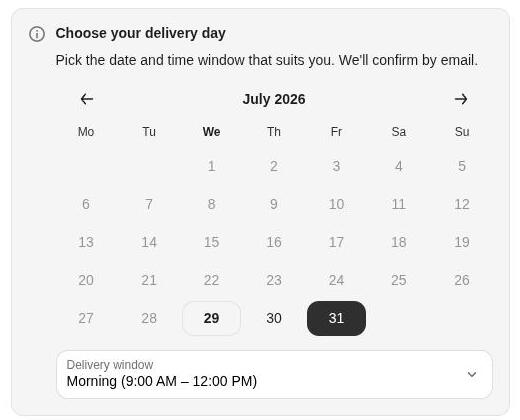
Shoppers choose a delivery or pickup date and time window on the checkout page itself — no theme edits, no extra step after payment.
TrueSlot adds a delivery and pickup slot picker to Shopify checkout. You set the days, cutoffs, and capacity — shoppers only ever see slots you can deliver.
Why merchants switch
0
Theme edits to install
3
Methods — delivery, pickup, shipping
5 min
From install to live picker
1
Slot on every order
Set the rules once and TrueSlot carries the date, the window, and the method from the checkout page through to fulfilment.
Shoppers choose a delivery or pickup date and time window on the checkout page itself — no theme edits, no extra step after payment.
Cap how many orders each day and each window can take. Full windows close themselves, so a busy Saturday never gets oversold.
Every order carries its chosen slot into the admin — as order tags, the order note, a metafield, or a location for routing.
The picker only ever offers what your operation can actually deliver — because every constraint lives in one settings hub.
Pick the days you deliver and the hour a same-day order has to be in by. Everything past the cutoff rolls to the next working day.
Hold back the first bookable date by as many days as you need to pick, pack, or bake — set once, applied to every order.
Close individual dates for holidays, stock takes, or a full van. Blocked days never appear as an option at checkout.
Limit orders per day and per time window. Once a window fills it closes itself, so the schedule can never be oversold.
Match on postal code so shoppers outside your radius are told before they pay, not after the order lands.
Store pickup, local delivery, and shipping each get their own days, windows, and lead times rather than sharing one schedule.
TrueSlot's admin sits inside Shopify. Open the day you're packing and see exactly which orders belong to which window.
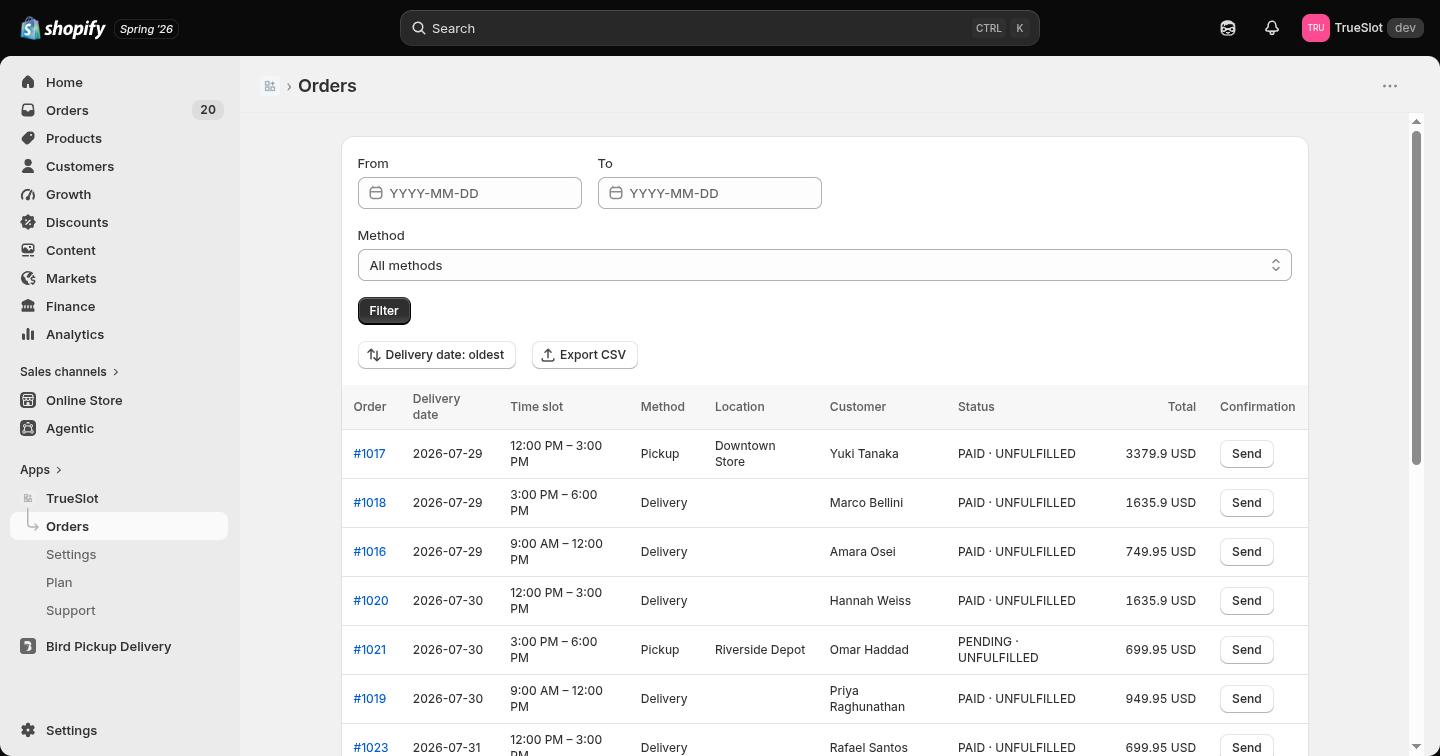
Filter scheduled orders by date, method, or slot, then work the day's run in the order you'll drive it.
Working days, lead times, cutoffs, slots, capacity, blackout dates, and emails all live in the same place.
Send a reschedule link on the order so customers move themselves to another open slot instead of emailing you.
The picker appears in checkout the moment the app is installed — no theme edits, no code to paste.
Choose working days, lead time, same-day cutoff, blackout dates, and capacity caps in one settings hub. The picker only ever offers what those rules allow.
Every order arrives tagged with its date and window, so your admin view — and any tool reading order tags — can be sorted into a run sheet.
Billed through Shopify, on your regular store invoice. Change or cancel any time.
Free
$0/forever
Core scheduling to get started.
Add to ShopifyEssential
Most popular$9.99/month
Emails and checkout controls.
Start free trialPro
$19.99/month
Built to scale.
Start free trialEnterprise
Custom
For high-volume stores.
Contact usPractical answers about setup, checkout, fulfilment, and what happens to the slot after an order is placed.
Yes. The picker renders inside Shopify checkout as a checkout UI extension, so it works with every theme and needs no template edits. You can also add a picker to the cart page from the theme editor if you want shoppers to choose earlier.
On the order. It shows on the order details page in your Shopify admin, and can also be written to order tags, the order note, an order metafield, or a location — so it flows into whatever fulfilment or shipping app you already use.
Yes. Set a daily cap and a separate cap per time window. When a window fills up it stops being offered, and when the day is full the date closes. Lead times and same-day cutoffs stop last-minute orders you cannot deliver.
Yes. Block individual dates, close whole weekdays, sync public holidays for your country, and force any single date open or closed when you make an exception.
Yes. Pickup, local delivery, and shipping each get their own working days, lead times, and time windows, so a pickup slot never borrows the delivery calendar.
Yes. Checkout validation blocks payment until a date and slot are chosen, and payment rules can hide methods that do not apply to the selected slot.
Confirmation emails go out with the chosen date and window, and a reminder email lands before the slot. Customers can also open a reschedule link from their order to move to another available slot.
Yes, on Shopify Plus. Delivery surcharges add a fee for weekend, holiday, or rush slots automatically as a line item in the cart.
Yes. The Free plan covers core scheduling for up to 20 scheduled orders a month. Paid plans from $9.99/month add emails, checkout controls, reschedule links, and higher order limits.
Install TrueSlot, set your working days and capacity, and let shoppers pick from slots you actually have room for.